 squirrelworks
A batch file is a plain-text script used in DOS and Windows to execute a series of commands via the command-line interpreter (cmd.exe). While .bat and .cmd files are functionally similar, they differ significantly in error handling: .cmd updates the ERRORLEVEL variable after every command, whereas .bat only updates when a specific error occurs.
The most significant practical difference is how a successful command affects the system state. In a .cmd file, every successful command resets the error status to zero. In a .bat file, a success does nothing to the previous error state.
@echo off
:: Force an error by trying to 'dir' a non-existent folder
dir \non_existent_folder >nul 2>&1
echo After error: %ERRORLEVEL%

:: Run a successful command
dir >nul
echo After success: %ERRORLEVEL%
dir reset the status.
Understanding the ERRORLEVEL reset is not just a technical curiosity; it is a fundamental requirement for error handling. In a .bat script, the error state is "sticky"—once an error occurs, it persists even if subsequent commands are successful.
In a professional environment, .cmd is preferred because it provides deterministic feedback. If you are deploying software or modifying the registry, you need to know if the last action succeeded. A .cmd file ensures the error variable accurately reflects the most recent command, allowing for precise "if-then" logic in automated workflows.
Legacy scripting has largely been superseded by PowerShell (.ps1). To ease the transition, PowerShell utilizes aliases that map familiar legacy commands to modern cmdlets:
dir → Get-ChildItemcd → Set-Locationcopy → Copy-Itemmove → Move-Itemmkdir → New-Itemcls → (Internal Native)Despite being "old," Batch remains a lightweight tool for quick automation and diagnostics where PowerShell overhead isn't required. Let’s explore some still-potentially-useful commands and one-liners.
The WMIC utility remains a powerful tool for quick system audits, despite its pending removal in future Windows 11 versions.
wmic diskdrive get Availability,Index,Caption,Statuswmic qfe list briefBatch scripts are frequently used to automate persistent network mapping and routing table modifications.
net use T: \\serverNameOrIP\shareName /persistent:yesroute -p add 192.168.1.83 mask 255.255.255.255 172.16.1.1 metric 31 if 11Batch allows for complex string manipulation using the ~ operator—useful for parsing file names or dates.
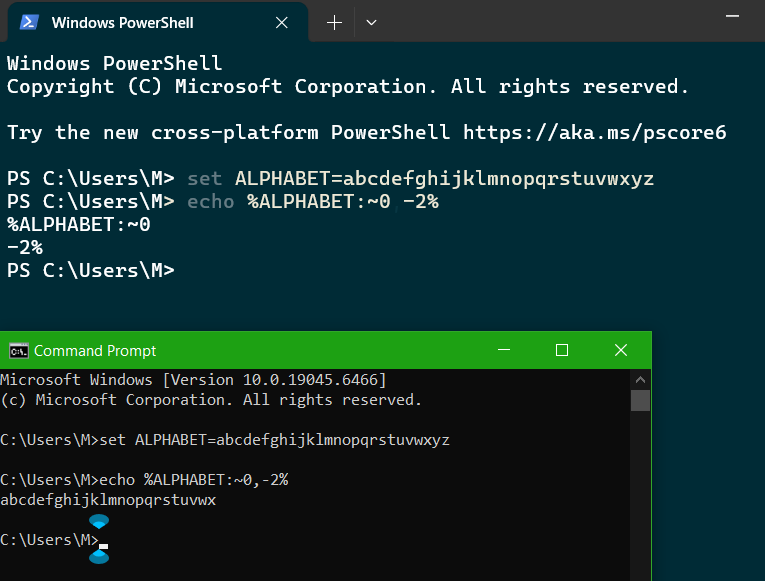
set ALPHABET=abcdefghijklmnopqrstuvwxyz
:: Extract first 5 characters (abcde)
echo %ALPHABET:~0,5%
:: Omit the last 2 characters
echo %ALPHABET:~0,-2%This ~ syntax is unique to CMD. Attempting to use this in PowerShell will result in a parsing error.
:: Find files > 1GB starting at C:\
forfiles /P C:\ /S /M * /C "cmd /c if @fsize GEQ 1073741824 echo @path"echo "Searching For Domain Status"
for /f "tokens=2" %%i in ('systeminfo ^| find "Domain"') do (set "DOMAIN=%%i")
if "%DOMAIN%" == "WORKGROUP" (
echo "Joining Domain"
netdom join /d:mydomain.com %COMPUTERNAME% /ud:[USER] /pd:[PASSWORD]
shutdown.exe /r /t 00
) else (
echo "Already in Domain"
)Starting with Windows 11, version 24H2, WMIC is removed by default. Microsoft recommends transitioning legacy WMIC tasks to PowerShell.
Also see: Windows Server setup in Virtualbox →