 squirrelworks

To eliminate Ulnar Deviation (the outward bending of the wrists), the primary input device is a Mistel Barocco MD770. As a "Split" mechanical keyboard, the left and right halves are independent, allowing the host to place them at shoulder-width. This opens the chest and prevents the "hunching" associated with standard 104-key boards.
The 75% layout provides a dedicated function row and arrow keys—critical for high-velocity CLI navigation—without the complex "layer" switching found in smaller 60% boards. As noted in the community consensus on Reddit, this form factor is a "gateway" to ergonomics, offering full TKL functionality in a modular footprint.
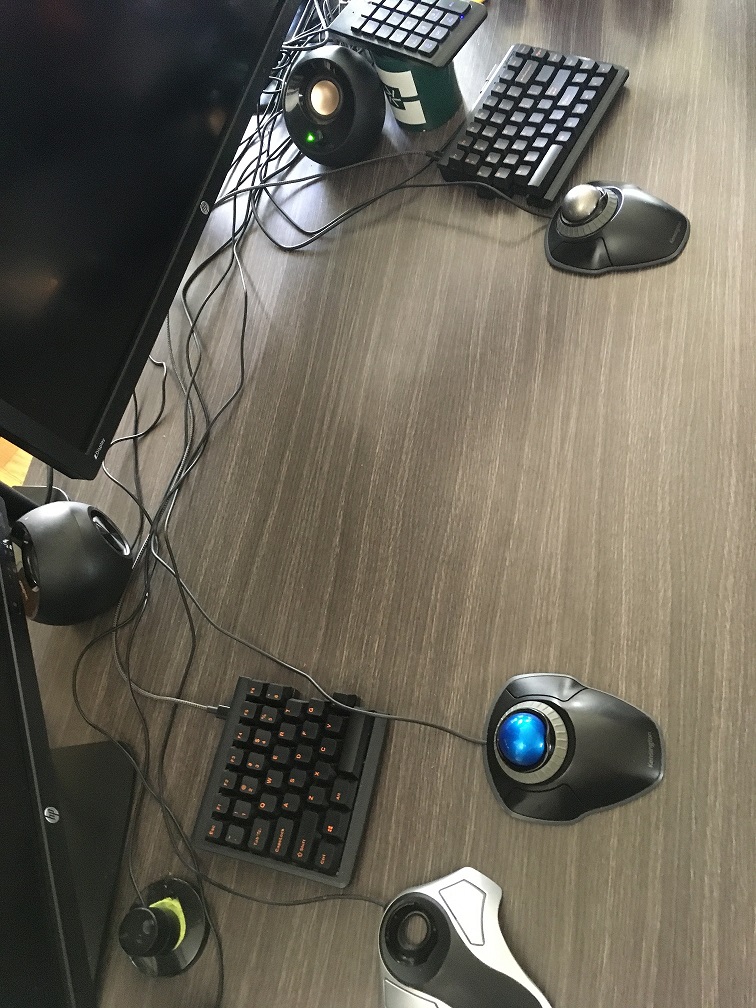
In this specific implementation, the MD770 halves will not sit flat. They are propped at a radical 70-degree vertical angle. This orientation moves the typing motion from a "palm-down" (pronated) position to a natural "handshake" (neutral) position. This effectively removes the constant torque on the radius and ulna bones during long coding sessions.


In ergonomics, "Tenting" refers to raising the inner edge of a split keyboard. Most commercial "tented" boards only offer 5–15 degrees of lift. By utilizing custom risers and high-friction therapy bands, this setup achieves an "Extreme Tent" of 70 degrees, maximizing the decompression of the carpal tunnel.
A typical IT worker performs roughly 12,000 keystrokes per day. On a standard "membrane" keyboard or heavy mechanical switch (requiring 80g of force), the user’s joints are effectively moving 960,000 grams—nearly 2,100 pounds—every single day. This "Slow Pressure" build-up is what leads to repetitive strain injury over a 20-year career... and if it takes 20 years get there, you can bet that there wont be a fast recovery.
The Mistel is equipped with Cherry MX Silent Red linear switches. These offer a low actuation force of 45g. By nearly halving the required pressure compared to standard office equipment, the daily "tonnage" moved by the fingers drops to approximately 1,100 pounds. This 50% reduction in mechanical stress is the primary defense against joint inflammation.


Actuation Point is the depth at which the computer registers the keypress. Bottom-out is the point where the key physically hits the board. Learning to release the key immediately after actuation is the ergonomic equivalent of "soft braking" in a car—it saves the mechanical components and your own joints from unnecessary impact.
Managing three separate systems and a six-monitor array requires high-velocity navigation. However, pushing a button rapidly requires significantly more force than a slow, controlled press. In high-impact scenarios, the peak force can increase by up to 94%. To move a key from a resting state to its actuation point across these systems in a shorter time window, the user must apply exponentially greater muscle force to overcome the hardware's inertia.
Rapid pressing typically employs "impact activation." Instead of meeting the minimum 45g threshold of a mechanical switch, the finger strikes the key at maximum speed. This creates a "jerky" motion that far exceeds the required activation force, hitting the "bottom" of the switch with a high-impact shockwave that vibrates through the finger's joints.
In systems administration, a sudden spike in user requests is a "Thundering Herd." Just as a rapid finger strike creates a force multiplier on a mechanical switch, a spike in requests creates a force multiplier on your server's CPU. If not "debounced" or rate-limited, both the finger and the server will eventually suffer from fatigue or total failure.
To combat the "thundering herd" of daily keystrokes, the keyboards are propped at a vertical lean. This ensures that even when "impact activation" occurs, the force is distributed through the stronger structure of the hand in a neutral handshake position, rather than being absorbed by the delicate carpal tunnel in a flat, pronated position.
Mechanical switches in mice, keyboards, and server rack buttons have a finite Mean Time Between Failures (MTBF). High-force, rapid-fire clicking accelerates this timeline. By implementing "debouncing" in code and using low-actuation switches (like the Kensington Orbit centered in the image above), we protect the physical longevity of the hardware.

Rapid, forceful clicking is a diagnostic data point. When logs show a user "mashing" a Submit button 10 times in 2 seconds, the physical force they are applying is a signal of system latency. As seen in the overhead view, the centralized trackball array and 10-key are positioned to allow for rapid access, but the setup is engineered to keep that speed from becoming an "emergency" mindset that leads to error.
In circuitry, debouncing ensures that one physical "mash" of a button results in exactly one clean signal. Without it, the high-impact force of a rapid press could cause the metal contacts to "bounce," sending dozens of phantom signals to the OS—a critical failure point in terminal-heavy workflows.
Project Complete: Return to Workspace Engineering Overview →