squirrelworks

Virtualbox: Windows Server 2022 Deployment

Project Goals
  • Create a Windows Server build from scratch in VirtualBox.
  • Configure Active Directory (ADDS), DNS, and DHCP.
  • Establish a Client PC and successfully bind it to the new domain.
  • Implement routing through the Domain Controller for internet connectivity.
1. Overcoming the "No Images Available" Error

During the initial setup, the Windows installer returned a critical error: no images are available. Research revealed that this was caused by entering a Product Key during the VirtualBox Unattended Install configuration.

No images available error
Microsoft documentation on error

Resolution: The VM was recreated with the Unattended Install features disabled. As shown below, the OS activated itself later, likely pulling the key from the initial cached attempt.

Successful version selection
OS Activation Proof

Project Milestone: Active Directory & Network Configuration

1. Static IP and Secondary NIC Integration

ADDS requires a Static IP. To maintain internet access, a second NIC was added. One handles the external DHCP connection, while the second is assigned a static IP for internal traffic.

2. Promoting the Domain Controller (AD Forest)

The server was promoted to a Domain Controller for AD.SQUIRRELWORKS.DEV.

Project Milestone: Essential Roles (DNS, DHCP, & Routing)

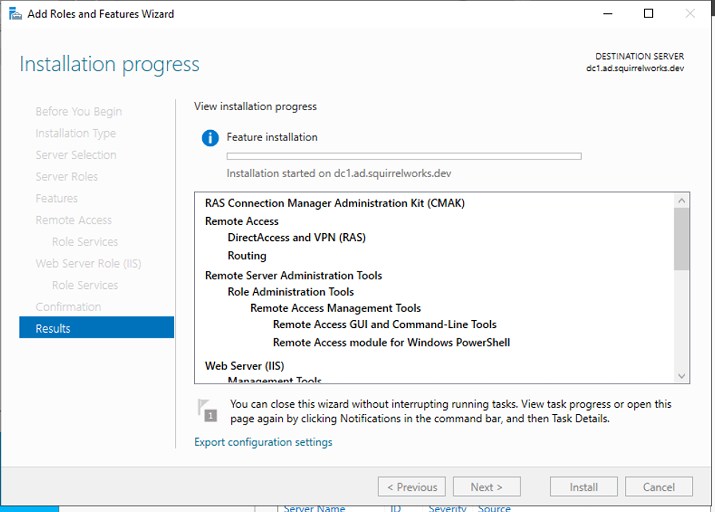
1. Remote Access and NAT Routing
2. DHCP Server & Scope Configuration

Project Milestone: Client Integration

1. Domain Bind and Topology Verification

A Windows Client was successfully joined to the AD.SQUIRRELWORKS.DEV domain after receiving DHCP settings from the DC.

Final Network Topology
IP Topology Diagram


Accessibility
 --overview

Agile
 --DevOps overview
 --Principles

API
 --REST best practices
 --REST demo
 --REST vs RPC
 --Wikipedia API

Blockchain
 --overview

Cloud
 --AWS overview

CSS/HTML
 --Bootstrap carousel
 --Grid demo
 --markdown demo

Electricity
 --fundamentals

Encoding
 --Overview

Ergonomics
 --Desk configuration
 --Device fleet
 --Input device array
 --keystroke mechanics
 --Phones & RSI

ERP
 --Anthology overview
 --Ellucian Banner
 --Higher Ed ERP Simulation Lab
 --PeopleSoft Campus Solutions
 --PESC standards
 --Slate data model

Git
 --syntax overview
 --troubleshooting libcrypto

Hardware
 --Device fleet
 --Homelab diagram

Java
 --Fundamentals

Javascript
 --Advanced Interaction: jQuery & UI Frameworks
 --input prompt demo
 --misc demo
 --Time and Date functions
 --Vue demo

Linux
 --grep demo
 --HCI and Proxmox
 --Proxmox install
 --xammp ftp server

Mail flow
 --DKIM, SPF, DMARC
 --MAPI

Microsoft
 --AZ-800: Administering Windows Server Hybrid Core Infrastructure
 --BAT scripting
 --Group Policy
 --IIS
 --robocopy
 --Server 2022 setup - Virtualbox

Misc
 --Applications
 --regex
 --Resources
 --Sustainable Computing
 --Terminology
 --Tribute to Computer Scientists

Networks
 --BGP Peering & Security Hardening Lab
 --CCNA Lammle Study Guide
 --Cisco 1921/K9 router
 --routing protocols
 --throughput calculations

PHP/SQL
 --Cookies
 --database interaction
 --demo, OSI Layers quiz
 --Foreign key constraint demo
 --fundamentals
 --MySQL and PHPmyAdmin setup
 --pagination
 --security
 --session variables
 --SQL fundamentals
 --structures
 --Tables display

Python
 --fundamentals

Security
 --Overview- GRC (Governance, Risk, and Compliance)
 --Security Blog
 --SSH fundamentals

Serialization
 --JSON demo
 --YAML demo