
squirrelworks

Systems Architecture > Identity & Access Management

Architecting the Authoritative HR Identity Database Engine

In enterprise security, identity records should never originate directly inside target directories like Active Directory or Okta. Instead, a central Human Resources database serves as the authoritative Single Source of Truth (SSOT). Here is a deep dive into the design, constraints, and PowerShell interaction mechanics of hr_system.db hosted on server APP1.
SQLite Architecture SSOT Design PSSQLite Interop
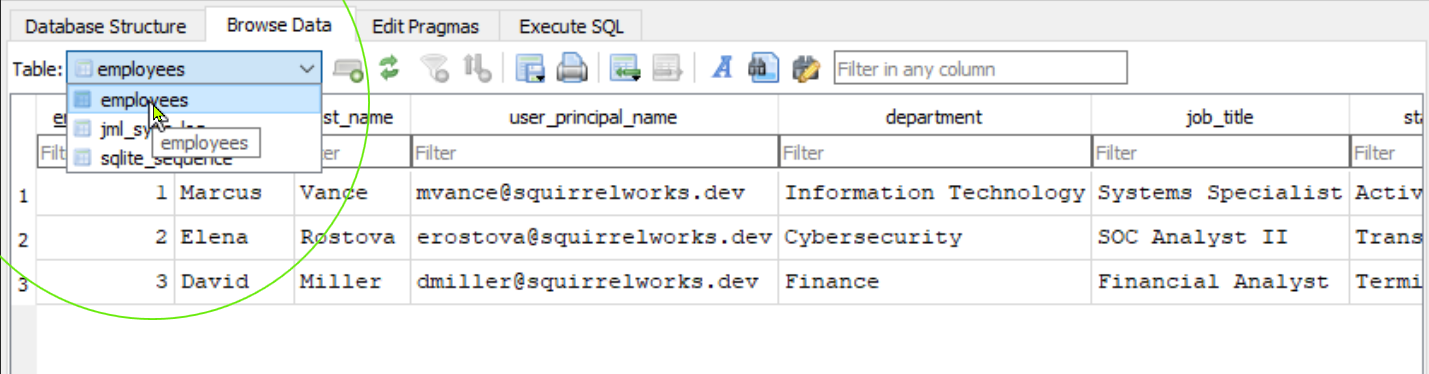
DB Browser for SQLite showing employees table on APP1

1. Identity Governance & Single Source of Truth (SSOT)

Ad-hoc identity provisioning leads to "ghost accounts," inconsistent user attributes, and delayed offboarding. By enforcing an upstream Human Resources (HR) system as the authoritative origin, downstream systems automatically reflect real-world employment state transitions.

Upstream Data Flow

HR records (hr_system.db) → Automation Engine (APP1) → Active Directory (DC1) → Cloud IdP (Entra ID / Okta). Access is systematically granted or revoked based on database updates.

Why SQLite for Lab Automation?

SQLite provides a zero-configuration, serverless, self-contained relational database file (C:\IAM_Automation\hr_system.db). It supports full SQL syntax, table constraints, and seamless PowerShell interaction without complex RDBMS overhead.

2. Schema Architecture & Table Definition (DDL)

The database schema is structured around two core operational requirements: maintaining clean identity profiles and recording immutable execution audit entries.

HR System Database Schema — ER Diagram
erDiagram employees { int employee_id PK string first_name string last_name string user_principal_name UK string department string job_title string status "Active | Transferred | Terminated" datetime created_at } jml_sync_log { int log_id PK int employee_id FK string action_type "JOINER | MOVER | LEAVER" string status "SUCCESS | FAILED" string details datetime timestamp } employees ||--o{ jml_sync_log : "generates audit log"
Authoritative Employees Table
DB Browser for SQLite showing employees table on APP1

Core employee records in hr_system.db defining user states (Active, Transferred, Terminated).
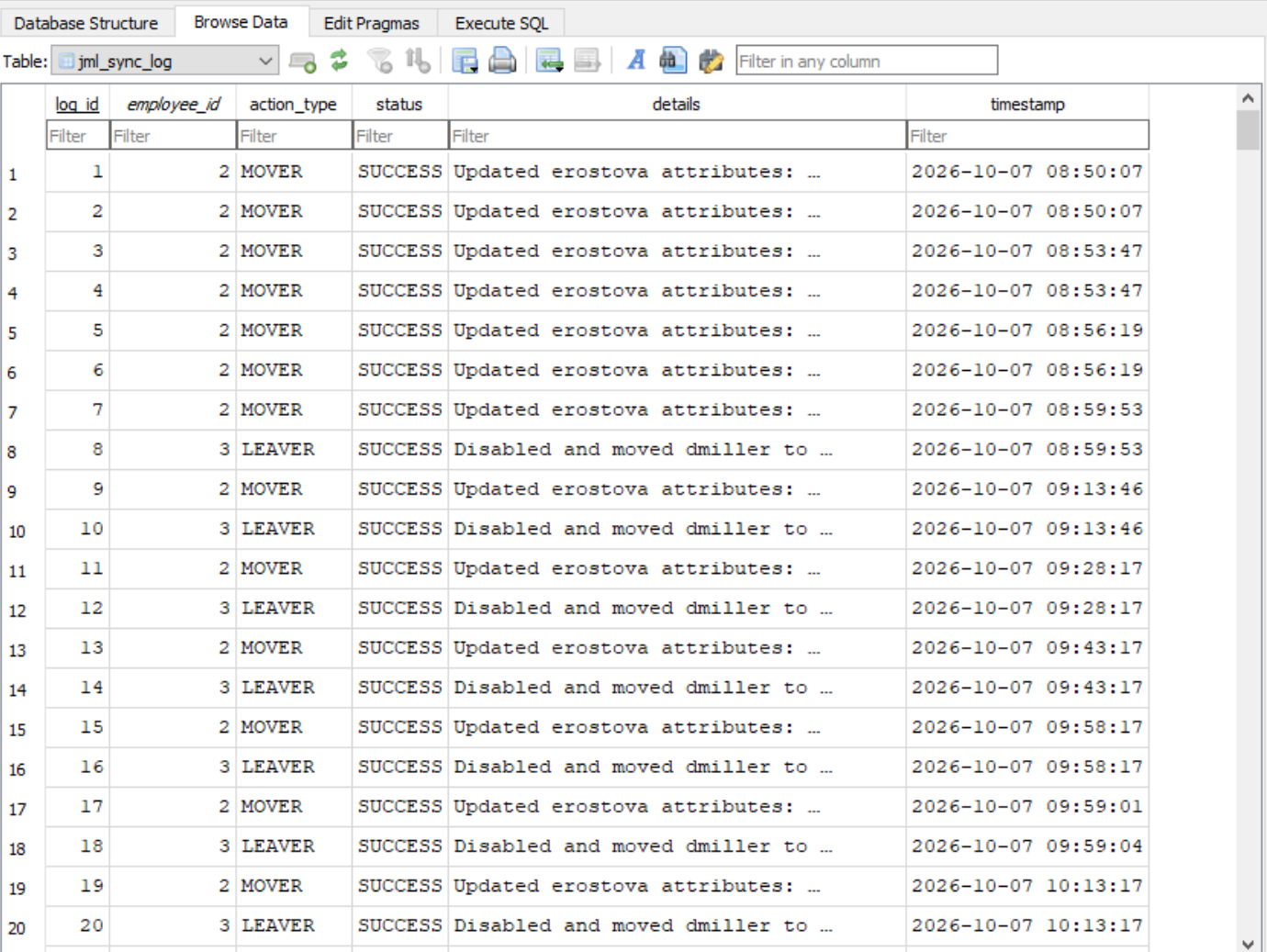
Execution Audit Trail Table
DB Browser for SQLite showing jml_sync_log table on APP1

The jml_sync_log table logging every Joiner, Mover, and Leaver execution timestamp and status detail.

Data Definition Language (DDL) Definition

Strict column constraints ensure data integrity prior to executing Active Directory commands:

-- Core Employee Table
CREATE TABLE IF NOT EXISTS employees (
    employee_id INTEGER PRIMARY KEY AUTOINCREMENT,
    first_name TEXT NOT NULL,
    last_name TEXT NOT NULL,
    user_principal_name TEXT UNIQUE NOT NULL,
    department TEXT NOT NULL,
    job_title TEXT NOT NULL,
    status TEXT CHECK(status IN ('Active', 'Transferred', 'Terminated')) NOT NULL,
    created_at DATETIME DEFAULT CURRENT_TIMESTAMP
);

-- Execution Log Table for Audit & HTML Reporting
CREATE TABLE IF NOT EXISTS jml_sync_log (
    log_id INTEGER PRIMARY KEY AUTOINCREMENT,
    employee_id INTEGER,
    action_type TEXT NOT NULL,
    status TEXT NOT NULL,
    details TEXT,
    timestamp DATETIME DEFAULT CURRENT_TIMESTAMP,
    FOREIGN KEY(employee_id) REFERENCES employees(employee_id)
);

3. PowerShell Query Patterns via PSSQLite

The synchronization script Invoke-HRIdentitySync.ps1 uses the lightweight PSSQLite module to execute parameterized queries against hr_system.db directly in memory.

# Import module & set path
Import-Module PSSQLite
$dbPath = "C:\IAM_Automation\hr_system.db"

# Query all active employees to drive Joiner logic
$activeUsers = Invoke-SqliteQuery -Database $dbPath -Query "SELECT * FROM employees WHERE status = 'Active'"

# Insert execution audit entry
$logQuery = "INSERT INTO jml_sync_log (employee_id, action_type, status, details) VALUES (1, 'JOINER', 'SUCCESS', 'Account provisioned')"
Invoke-SqliteQuery -Database $dbPath -Query $logQuery
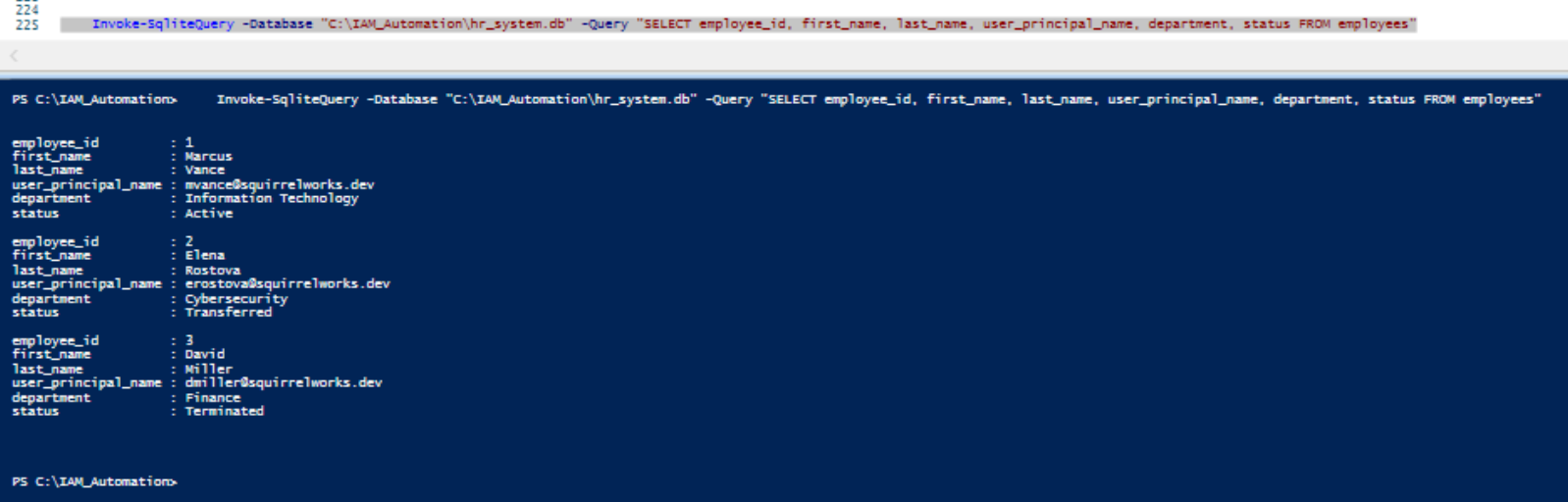
PowerShell SQLite Query Verification on APP1
PowerShell console executing Invoke-SqliteQuery against hr_system.db

Live console query output on host APP1 showing direct evaluation of the employees table via Invoke-SqliteQuery.

Tech Fact Icon
Architecture Key Takeaway

Decoupling HR business logic into an upstream SQLite database allows seamless updates to employee lifecycle states without modifying core Active Directory synchronization logic.


Accessibility
 --overview

API
 --REST best practices
 --REST demo
 --REST vs RPC
 --Wikipedia API

Blockchain
 --overview

Blog
 --The 'Brute Force' Mistake
 --The Bezosian Protocol: Eliminating Learned Helplessness
 --The Humility Protocol: Reality Over Reputation
 --The Jobsian Protocol: Systems Analysis as a War on Entropy
 --The Jordan Framework: Engineering a Competitive Edge
 --Time Management as an Operational System: The Tracy Framework
 --Tracy on Goals: Vector Alignment & Execution

Cloud
 --AWS overview

CSS/HTML
 --Admissions Portal Simulation Lab
 --Bootstrap carousel
 --Grid demo
 --markdown demo

DevOps
 --Agile Principles
 --DevOps overview
 --Drupal, containerized
 --Prometheus & Grafana
 --RKE2: Deploying the Rancher Kubernetes Engine

Encoding
 --Overview

Ergonomics
 --Desk configuration
 --Device fleet
 --Input device array
 --keystroke mechanics
 --Phones & RSI

ERP
 --Anthology overview
 --Ellucian Banner
 --Higher Ed ERP Simulation Lab
 --PeopleSoft Campus Solutions
 --PESC standards
 --Slate data model

Git
 --Authoring & Deploying the Post-Receive Hook
 --Pipeline Optimization, Web-Root Migration, & Dependency Remediation
 --syntax overview
 --troubleshooting libcrypto

Hardware
 --Device fleet
 --Electricity fundamentals
 --Homelab diagram

Identity & Access
 --Architecting the Authoritative HR Identity Database Engine
 --Automating Enterprise IAM Lifecycles
 --Data Modeling
 --Deploying Entra Connect
 --Foundations
 --OIDC Integration
 --Provisioning Okta Dev Tenant

Java
 --Fundamentals

Javascript
 --Advanced Interaction: jQuery & UI Frameworks
 --input prompt demo
 --misc demo
 --Time and Date functions
 --Vue demo

Linux
 --Auditing the live interface state using ethtool
 --grep demo
 --HCI and Proxmox
 --Persistent Infrastructure Telemetry: TMUX
 --Proxmox install
 --xammp ftp server

Mail flow
 --DKIM, SPF, DMARC
 --MAPI

Microsoft
 --AZ-800: Administering Windows Server Hybrid Core Infrastructure
 --BAT scripting
 --Group Policy
 --IIS
 --robocopy
 --Server 2022 setup - Virtualbox

Misc
 --Applications
 --Computer Science Foundations
 --Field Notes: RainPoint Bluetooth Hose Timer
 --Protocols, TLS & Distributed Scale
 --regex
 --Resources
 --Runtimes, ASTs & Data Structures
 --Sustainable Computing
 --Terminology
 --Tribute to Computer Scientists

Networks
 --BGP Peering & Security Hardening Lab
 --CCNA Lammle Study Guide
 --Cisco 1921/K9 router
 --NGFW vs. Legacy
 --routing protocols
 --throughput calculations

PHP/SQL
 --Cookies
 --database interaction
 --demo, OSI Layers quiz
 --Foreign key constraint demo
 --fundamentals
 --MySQL and PHPmyAdmin setup
 --pagination
 --security
 --session variables
 --SQL fundamentals
 --structures
 --Tables display

Python
 --fundamentals

Security
 --Kerberos: Protocol Architecture
 --NTP Overview
 --Overview- GRC (Governance, Risk, and Compliance)
 --Security Blog
 --SSH fundamentals

Serialization
 --JSON demo
 --YAML demo