 squirrelworks
Scaling a bare-metal virtualized multi-node RKE2 Kubernetes cluster exposes the stark architectural differences between standard virtual machine workloads and cloud-native container orchestrators. When a heavy operational deployment hits the cluster topology, it drives high-frequency network throughput and complex encapsulation schemas that can force the underlying hypervisor's physical network interface card (NIC) into a catastrophic hardware locking sequence.
This deep-dive maps the exact engineering failure path of the native Intel e1000e driver under intensive cluster workloads, analyzes the kernel-level diagnostics of a Detected Hardware Unit Hang event, and details the structural system configuration required to shift packet processing to the host compute plane—permanently hardening your infrastructure platform against data-induced network collapses.
Incident Post-Mortem: While deploying heavy cloud-native operations (like the kube-prometheus-stack), the high-frequency network throughput driven by container orchestration engines can push underlying hypervisor hardware adapters past their physical queue thresholds. On systems utilizing standard Intel network interfaces managed by the compiled-in e1000e driver, this traffic spike can trigger a fatal hardware locking sequence that drops the host entirely offline.
To isolate the root cause of the hypervisor collapse while guest instances remained non-responsive, the live system log state was interrogated directly from the bare-metal Proxmox shell using the system daemon logger: journalctl -b 0 -e. The resulting output stream exposes a classic Intel e1000e TX Ring Buffer Deadlock. The repeating red kernel alerts trace a hardware loop where the Transmit Descriptor Tail (TDT <f>) advanced past the Transmit Descriptor Head (TDH <e6>). Because the network interface card's processing queue completely desynchronized under the pressure of the RKE2 network blast, the onboard microchip exhausted its buffer states, triggered a persistent Detected Hardware Unit Hang event, and stopped processing hardware interrupts entirely—silently severing host networking until the physical driver layer was forcefully torn down and reset during the subsequent network service restart.
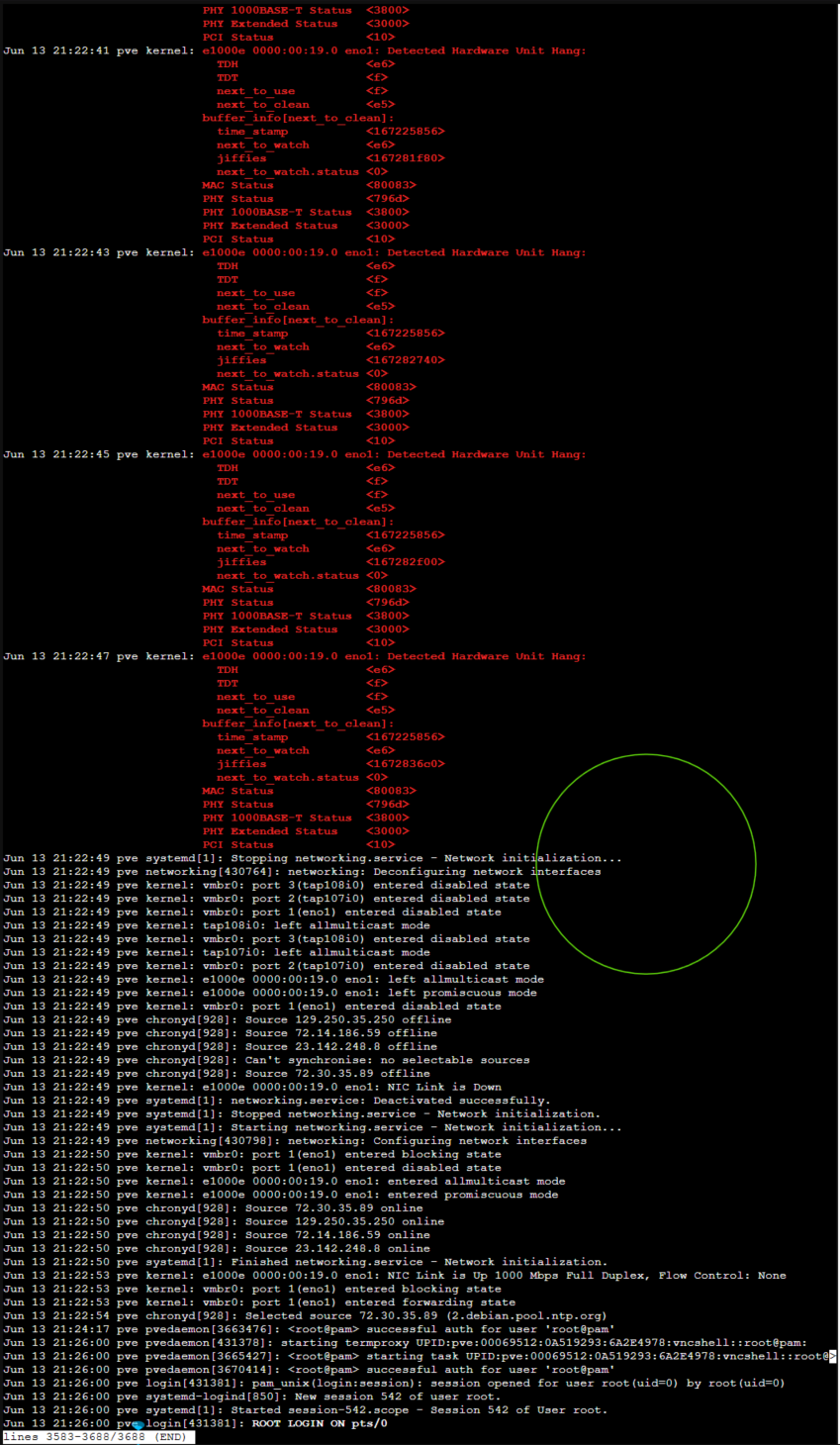
When an enterprise CNI (like Cilium) or heavy container downloads saturate the network interface, the network interface card's (NIC) internal Transmit Descriptor Head and Tail pointers desynchronize. The chip's memory buffers overflow, causing the driver to flag a Detected Hardware Unit Hang loop. This results in an immediate loss of SSH connectivity and management GUI access while the virtual machines sit stranded in a zombie state.
The VM guest kernels hand massive blocks of data directly to the physical NIC chip to segment into standard network frames. Under cluster loads, the card's low-power onboard processor exhausts its buffers and freezes the kernel interface.
By turning off hardware offloading, packet slicing and checksum calculations are shifted to the host's robust system CPU. The NIC is relegated to a simple pass-through pipe, eliminating buffer overflows entirely.
To ensure the hypervisor driver configuration survives host reboots, the runtime modifications must be cleanly appended as a system hook inside the network interface initialization definitions file.
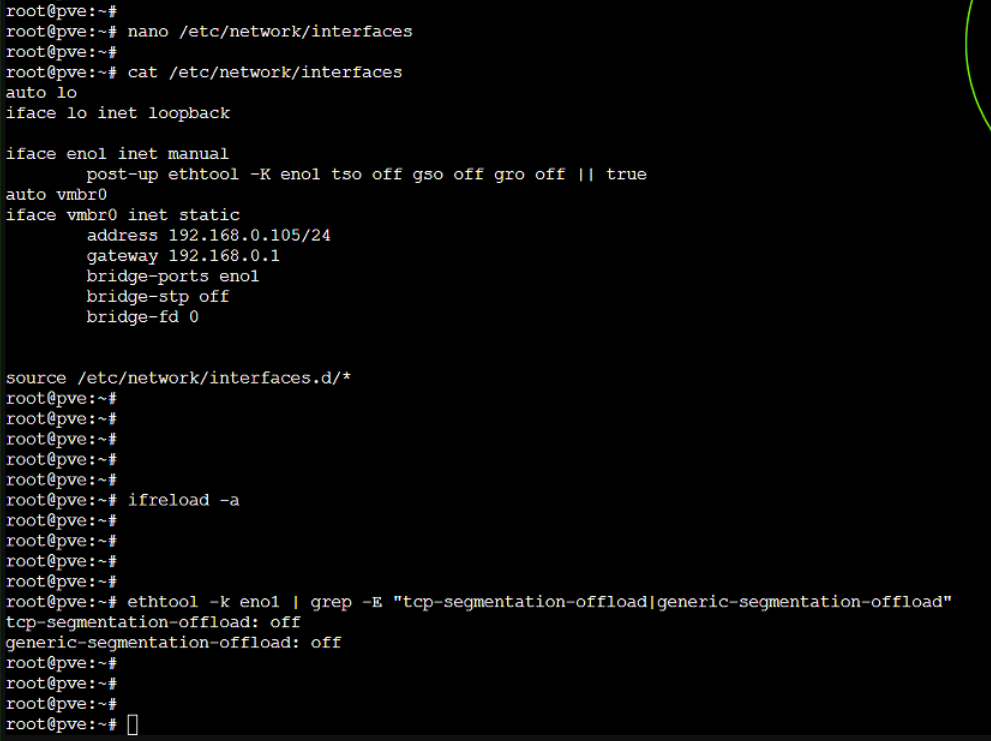
Log into the bare-metal Proxmox shell as root, open the primary network definition configuration using a text editor, and locate the physical interface stanza (e.g., eno1):
nano /etc/network/interfacesIndent a single tab directly beneath the targeted interface entry to map the ethtool execution properties. The addition of the trailing conditional ensures that error states do not halt global interface initialization during boot sequences:
iface eno1 inet manual
post-up ethtool -K eno1 tso off gso off gro off || trueRather than performing a hard hardware power cycle to test the configuration, instruct the networking engine to hot-reload the definitions file into the running kernel immediately.
ifreload -aAudit the live interface state using ethtool to confirm that TCP Segmentation Offloading (TSO) and Generic Segmentation Offloading (GSO) have dropped to an active inactive state:
ethtool -k eno1 | grep -E "tcp-segmentation-offload|generic-segmentation-offload"tcp-segmentation-offload: off
generic-segmentation-offload: off
Once the driver hooks read off, recycle the individual guest VM cluster nodes via the hypervisor console. This forces their virtual network cards to cleanly attach to the newly stabilized host bridge layer.