 squirrelworks
While our lab focuses on the Cisco ASA 5506-X, the distinction between "Regular" and "Next-Gen" firewalls defines how modern networks are architected. Understanding where to deploy each is critical for balancing security with network performance.
NGFWs operate at Layer 7, performing Deep Packet Inspection (DPI) to identify specific applications rather than just ports.
Legacy stateful firewalls (L3/L4) remain vital for Internal Segmentation where speed and low latency are the primary requirements.

Modern Hybrid Strategy: Most enterprise networks utilize a "Defense in Depth" approach. The NGFW acts as the rigorous Border Patrol at the internet edge, while Legacy ACLs provide the internal speed needed for east-west traffic inside the data center.

This lab utilizes a Cisco ASA 5506-X to establish a "Three-Legged" topology, segmenting the network into Inside (Trusted), Outside (Untrusted), and a DMZ (Semi-Trusted). This physical and logical separation prevents lateral movement during a breach.
Security Zones: Unlike traditional bouncers, an NGFW manages trust via Security Levels (0-100). Traffic logic is defined by these levels: higher levels can talk to lower levels by default, but lower levels require explicit permission to talk back.
! Define high-trust internal network
ciscoasa(config)# interface g1/1
ciscoasa(config-if)# nameif inside
ciscoasa(config-if)# security-level 100
ciscoasa(config-if)# ip address 192.168.1.1 255.255.255.0

! Define web-facing DMZ zone
ciscoasa(config)# interface g1/2
ciscoasa(config-if)# nameif dmz
ciscoasa(config-if)# security-level 50
ciscoasa(config-if)# ip address 172.16.1.1 255.255.255.0

! Define untrusted internet gateway
ciscoasa(config)# interface g1/3
ciscoasa(config-if)# nameif outside
ciscoasa(config-if)# security-level 0
ciscoasa(config-if)# ip address 203.0.113.1 255.255.255.0
ciscoasa(config)# policy-map global-policy
ciscoasa(config-pmap)# class inspection_default
ciscoasa(config-pmap-c)# inspect icmp
! On a Cisco ASA, the global_policy is just a name; for it to actually work, it must be "assigned" to the interfaces.
ciscoasa(config)# service-policy global_policy global
ciscoasa(config)#access-list INSIDE_IN extended permit icmp any any
ciscoasa(config)#acces-group INSIDE_IN in interface inside
ciscoasa(config)# access-list DMZ_OUT extended permit icmp any any
ciscoasa(config)# access-group DMZ_OUT in interface dmz
ciscoasa(config)# access-list OUTSIDE_IN extended permit icmp any any
ciscoasa(config)# access-group OUTSIDE_IN in interface outside
ciscoasa(config-if)#write mem
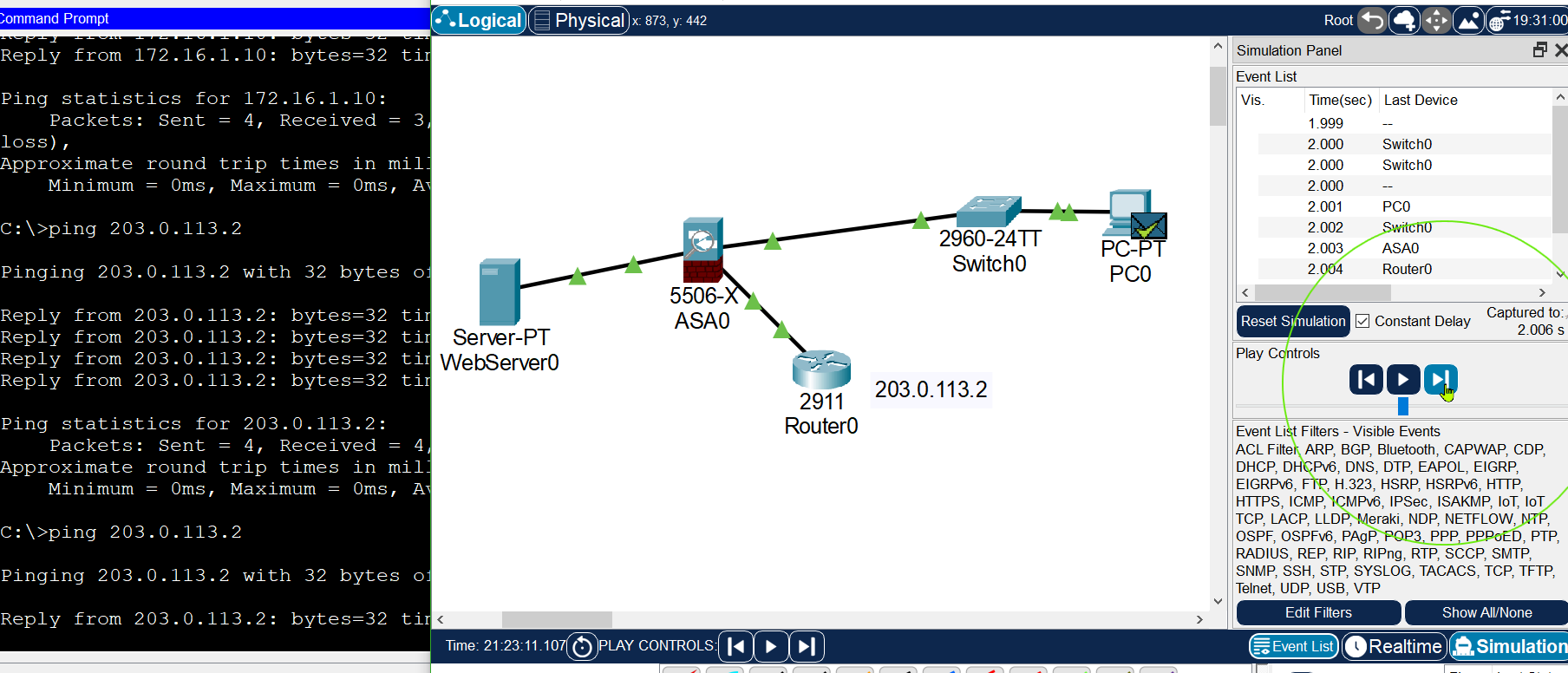
To simulate internet connectivity, we configured a 2911 Router (Router0) as the next hop. A critical step was ensuring the "return address" logic was applied to the router so it could communicate back to the internal subnets through the ASA.
! Configure WAN Interface
Router0(config)# interface g0/0
Router0(config-if)# ip address 203.0.113.2 255.255.255.0
Router0(config-if)# no shut

! Critical: Return path to ASA Outside Interface
Router0(config)# ip route 0.0.0.0 0.0.0.0 203.0.113.1
A network object named WEB_SERVER_EXT (External) typically represents the public-facing IP address of an internal server, allowing for reusable ACL and NAT rules rather than raw IP addresses.
ciscoasa(config)# object network WEB_SERVER_EXT
ciscoasa(config-network-object)# host 203.0.113.10
ciscoasa(config-network-object)# nat (dmz,outside) static 203.0.113.10
Internal users on the 192.168.1.0/24 network require translation to the ASA's outside IP (203.0.113.1) to reach external resources.
object network INSIDE_NET
 subnet 192.168.1.0 255.255.255.0
 nat (inside,outside) dynamic interface
Verification via show nat confirmed the successful mapping of internal packets:
ciscoasa# show nat
1 (inside) to (outside) source dynamic INSIDE_NET interface
    translate_hits = 12, untranslate_hits = 12
During implementation, the ASA 5506-X model in Packet Tracer rejected standard "shortcut" commands such as clear xlate and icmp permit as Invalid Input.
To allow ping replies from the outside (Security Level 0) to the inside (Security Level 100), an explicit ACL was required:
ciscoasa(config)# access-list OUTSIDE_IN extended permit icmp any any
ciscoasa(config)# access-group OUTSIDE_IN in interface outside
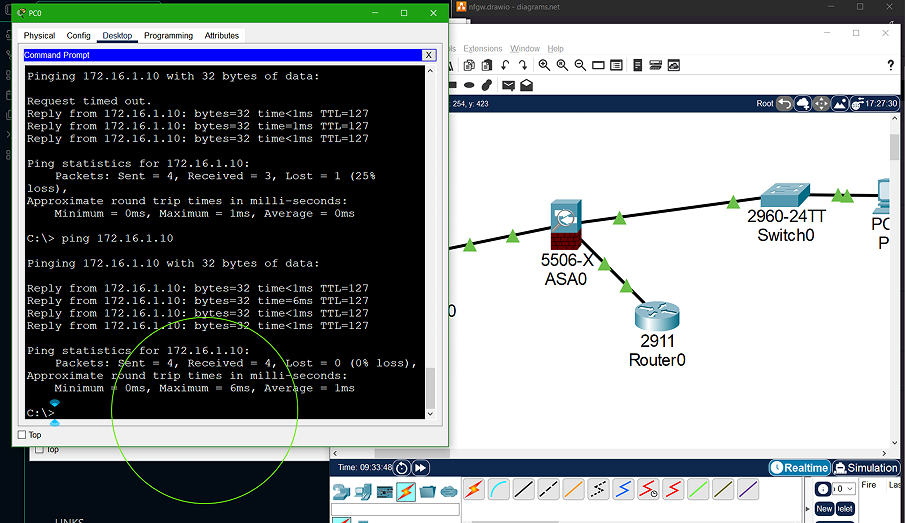
This resulted in successful end-to-end connectivity from PC0 to the Internet Router.
To allow internet traffic to reach the DMZ without exposing the internal LAN, we apply a specific Access Control List (ACL) to the 'Outside' interface.
access-list OUTSIDE-TO-DMZ extended permit tcp any host 172.16.1.10 eq 80
access-group OUTSIDE-TO-DMZ in interface outside
This ledger documents every command, verification step, and architectural correction made during the lab to overcome simulator limitations.
| # | Prompt | Command / Action | Logic / Explanation | Result |
|---|---|---|---|---|
| 01 | ciscoasa(config-if)# | nameif inside | Establishing the high-trust (Security Level 100) internal zone. | Success |
| 02 | ciscoasa(config-if)# | security-level 100 | Manual confirmation of the highest trust level for the LAN. | Success |
| 03 | ciscoasa(config-if)# | nameif outside | Establishing the zero-trust (Security Level 0) internet-facing zone. | Success |
| 04 | ciscoasa(config-if)# | security-level 0 | Assigning the lowest trust level for external traffic. | Success |
| 05 | ciscoasa(config-if)# | nameif dmz | Establishing the semi-trusted (Security Level 50) server zone. | Success |
| 06 | ciscoasa(config)# | route outside 0.0.0.0 0.0.0.0 203.0.113.2 | Configuring the ASA default gateway to reach the ISP router. | Success |
| 07 | Router0(config)# | ip route 0.0.0.0 0.0.0.0 203.0.113.1 | Adding a return route on the router to point back to the ASA. | Success |
| 08 | ciscoasa(config)# | object network INSIDE_NET | Defining a network object for the 192.168.1.0/24 subnet. | Success |
| 09 | (config-network)# | nat (inside,outside) dynamic interface | Enabling PAT so internal hosts can reach the internet. | Success |
| 10 | ciscoasa(config)# | object network WEB_SERVER_EXT | Defining a public IP object for the DMZ web server. | Success |
| 11 | (config-network)# | nat (dmz,outside) static 203.0.113.10 | Performing Static NAT to map the server to a public address. | Success |
| 12 | ciscoasa(config-pmap-c)# | inspect icmp | Enabling stateful inspection to allow ping replies. | Success |
| 13 | ciscoasa(config)# | icmp permit any outside | Attempting a shortcut command to permit inbound ICMP. | Invalid Input |
| 14 | ciscoasa(config)# | access-list OUTSIDE_IN extended permit icmp any any | Manual ACL fallback to permit ICMP replies on the outside. | Success |
| 15 | ciscoasa(config)# | access-group OUTSIDE_IN in interface outside | Applying the manual ACL to the outside physical interface. | Success |
| 16 | ciscoasa(config)# | access-list OUTSIDE-TO-DMZ extended permit tcp any host 172.16.1.10 eq 80 | Creating an ACL to allow public web traffic to the DMZ. | Success |
| 17 | ciscoasa(config)# | access-group OUTSIDE-TO-DMZ in interface outside | Activating the inbound web service policy. | Success |
| 18 | ciscoasa(config-pmap-c)# | inspect http | Enabling L7 HTTP inspection to track TCP state. | Success |
| 19 | ciscoasa# | packet-tracer input outside tcp 203.0.113.5 1234 203.0.113.10 80 | Simulating external web traffic for flow diagnostics. | Invalid Input |
| 20 | ciscoasa(config)# | sysopt connection tcpmss 1300 | Attempting to resolve PT browser hang by reducing MSS. | Invalid Input |
| 21 | ciscoasa(config)# | access-list INSIDE_IN extended permit tcp 192.168.1.0 255.255.255.0 host 172.16.1.10 eq 80 | Permitting the internal LAN to manage the DMZ server. | Success |
| 22 | ciscoasa(config)# | access-group INSIDE_IN in interface inside | Applying management access policy to the inside interface. | Success |
| 23 | PC0 Desktop | ping 172.16.1.10 | Verifying Layer 3 connectivity from PC to DMZ server. | Verified |
| 24 | PC0 Browser | URL: http://172.16.1.10 | Service test using the built-in Packet Tracer browser tool. | Timeout (PT Bug) |
| 25 | ciscoasa# | write memory | Saving the logically sound configuration to startup-config. | Saved |
From a pure engineering perspective, the three-zone architecture is fully operational. We successfully established a high-trust Inside LAN (100), a zero-trust Outside WAN (0), and a semi-trusted DMZ (50). By implementing Dynamic PAT for outgoing traffic and Static NAT for the DMZ web server, we achieved the core requirements of a modern perimeter defense. The connectivity was verified at Layer 3 via ICMP across all interfaces, proving that the routing table, security levels, and return-path routes on the ISP router are 100% accurate.
While the configuration is "production-ready," this lab highlighted the distinct gap between Cisco ASA emulation and Packet Tracer simulation. The rejection of standard commands like packet-tracer and sysopt connection forced a manual, more granular approach to Access Control Lists. The browser timeout encountered on PC0, despite successful pings and TCP inspection rules, is a documented artifact of how the simulator handles virtualized web requests across translated interfaces. In a physical environment, these verified flows would result in a successful HTTP handshake to the DMZ Web Server.
Final Takeaway: The value of this lab lies in the troubleshooting process. Moving beyond basic "allow all" rules to specific L7 HTTP inspection and manual ACL overrides demonstrates understanding of the ASA's packet-processing engine. This documentation serves as a blueprint for deploying a secure, three-legged firewall in a physical Cisco environment.
Also see: BGP Peering & Security Hardening Lab →